Phoenix Media: Graphic Design
Call us now (866)-977-0330
We are here for your questions
Showing posts with label Graphic Design. Show all posts

Wednesday, September 18, 2019

Clueless about Graphic Design?

September 18, 2019
Clueless about Graphic Design?
Having a good and prompt graphic designer can often be expensive and hard to find, but with Phoenix Media, it’s simple!
We have our own graphic design team that ranges in price (depending on the level of the designer and complexity of the project) and is always there when you need them! Our team can work one-on-one with you to help you reach your ultimate design goals.
We offer a variety of services from logo design to, simply, business cards. Whether it’s something small like changing an address on your current business card or something larger like branding, our designers are prepared to handle anything!
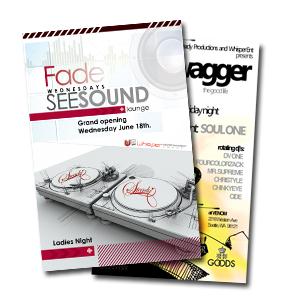
Check out some of our designs below:




Read More

Wednesday, December 6, 2017

The Importance of Business Cards

December 06, 2017
The Importance of Business Cards


Whether or not you realize it, business cards are one of the most powerful (and economical!) tools you have to market yourself and your business.

Think about it.

Simply put, they represent YOU (or your business). The colors you choose, the design, the size–they’re all reflections of your own personal style and the type of business you’re running.

At Phoenix Media, we feel that it’s important to take advantage of the freedom you have to create your own business card. It’s a first and last impression among your peers and clients. Especially in this economic climate, being able to stand out is crucial to the survival of your business.


Most importantly, business cards are MEMORABLE. Exchanging contact information can get sloppy and phone numbers that are added to a cell phone can often be forgotten about. By handing someone a business card, they’re much more likely to put it in their wallet or purse, which will inevitably make the card more visible.

And, although business cards come rather cheap these days, spending a little extra on them goes a long way. In the words of viral video superstar and pitchman, Joel Bauer, “if it looks like crap, IT IS crap!”


Read More

How-To: Using bleeds to properly format your document

December 06, 2017
How-To: Using bleeds to properly format your document


“What are bleeds?”

This is a common question often posed to us by our customers and it’s a rather difficult concept to explain. The best way we know how to describe bleeds is by showing bleeds. Take a look at the following document:


You should see three lines: safety, cut, and full bleed. All of your crucial text and images that you do not want cut off should not extend beyond the safety line. This line is to safeguard your text and images from the cutter, which can move slightly during the cutting process.

The dashed cut line is where the flyer will be cut. Again, sometimes the cutter can move slightly during the cutting process so it’s best to keep the important stuff within the safety line.

And, finally, the notorious full bleed line. This is where the contents of your document (back ground color, the parts of  images and text you don’t mind getting trimmed off, borders, etc.) should extend to in order to ensure a proper cut. The reason we require bleeds is to make sure that, when trimmed, there are no white slits showing around the edges of your document from the paper stock, since we print on white paper. We want your document to have a nice, clean cut.

Therefore, after your design is completed, your 4×6 file should measure 4.25×6.25 with the full bleed (that’s an additional 1/8 of an inch on all sides). This applies to any file you submit, whether it’s an 8.5×11 brochure, 11×17 poster, business card–ANYTHING. All designs must include the full bleed. We recommend setting the size of your document to the size with the full bleed prior to designing it and using our guide as a reference.

If you’re confused about how to setup your document, please check out the following video:


Read More